How a Golden Retriever That Went Viral Five Years Ago Ended Up as a Solana Token
2026-09-24

Many people can look up yesterday’s energy price, but not how much energy is left in their own wallet. So a transfer still burns TRX after you thought the energy was already rented. Renting energy is not the complicated part. What matters is how you get live energy data at the moment you send.
This short post will help you get the order of the lookups straight. It also explains what each figure really means. Every figure below was checked on 16 September 2026, and I have marked the ones that change.
TronScan needs no account, no installation and no API key. That makes it a good entry point for a lookup. Its different sections answer two different questions.
Your own address. Paste your T-address into the search box at tronscan.org and open the account page. Open the Resources section. It shows energy and bandwidth, each with its limit and the amount already consumed. It also lists the resource delegations the address has received. For a quick answer to how much energy you have left, this is the least effort. All it needs is the public wallet address: no wallet connection, no signature, no seed phrase.
For network-wide data, open the Data section. It gives the whole-network view. Two pages are worth watching:
Both kinds of data come from confirmed blocks and rely on a near-real-time index. So they really are slightly delayed compared with the raw chain data. For an occasional manual check that is fine. But if you need to send in bulk, or you want to keep the data as a record, you need the next source.
This is the source I rely on most. It is also the only interface that returns both layers in one request: account resources and network resources.
Where you call it. There is nothing to install. /wallet/getaccountresource accepts a plain GET request. You can paste a URL into any browser and read the JSON straight off the screen. Replace the placeholder with your own T-address:https://api.trongrid.io/wallet/getaccountresource?address=<YOUR_T_ADDRESS>&visible=true
api.trongrid.io is TronGrid, a public node gateway. It is used for convenience, not because it is required. Any TRON node serves this path and returns exactly the same JSON structure.
If you pull the data with a script, the call goes out differently. It becomes a POST with a JSON request body. That is the form to use in batch job code:
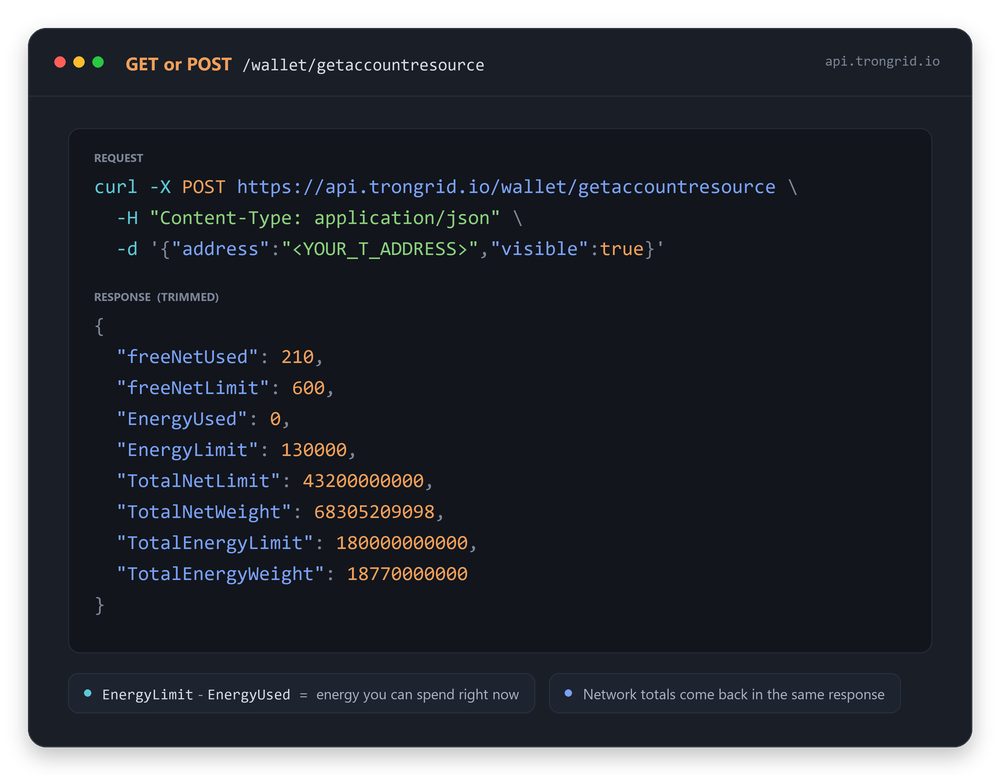
Four things are worth remembering. What decides whether a transfer succeeds is EnergyLimit minus EnergyUsed. It is not the figure on your provider’s order page. The same arithmetic, written out step by step, is in how to check whether you have enough TRON energy for a USDT transfer. EnergyLimit counts delegated energy together with your own staked energy, so one new delegation moves the number up. Fields missing from the response default to zero, so a short response does not mean the call failed. And when the address has never been activated, the call returns {}. That is a signal about whether the account exists, not a zero balance.
Chain parameters are the network settings the committee can vote to change. They are the root of why the numbers above move.
Where to look. TronScan has a parameters page: tronscan.org/#/sr/parameter. It lists every parameter and its current value. It also shows — the part I use most — the proposal that last changed it and when it took effect. The energy fee row points back to the proposal that set it (proposal #104 and its effective date). So you can tell at a glance whether a guide you are reading quotes a price that no longer applies.
To read it as data, call /wallet/getchainparameters. The call works the same way as the one above; only the path differs. Use a GET with no parameters, or a POST with an empty body. It returns a chainParameter array of key-value pairs. A few on/off switches come back with no value at all, and the chain reads them as zero. It returned 79 entries when I checked on 16 September 2026, so the four rows below are a selection, not the full list.
| Parameter | Value on 16 September 2026 | What it controls |
| getEnergyFee | 100 sun per unit | The price of burning TRX for energy |
| getTotalEnergyLimit | 180,000,000,000 | The network’s energy pool — committee parameter #19 |
| getDynamicEnergyMaxFactor | 34,000 | The ceiling multiplier on per-contract energy |
| getMaxDelegateLockPeriod | 864,000 blocks (about 30 days) | The longest a rental can be locked |
The figure to remember is the burn price. Energy costs 100 sun per unit, and 1 TRX is 1,000,000 sun. So burning 65,000 units of energy costs 6.5 TRX. Burning 130,000 units costs 13.0 TRX. Those counts are not arbitrary. Why the second is double the first is covered in how much TRON energy a transfer actually needs.
Three things to note. TronScan is a near-real-time index and can lag briefly. So when its page and a synced node disagree, trust the node. This interface returns parameters by name only, without the numeric IDs you see in governance discussions. And the energy pool hangs on three similar keys. getTotalEnergyLimit is the pool itself, and getTotalEnergyCurrentLimit currently reads the same number. getTotalEnergyTargetLimit reads 12,500,000, which is a threshold, not a pool.
A rental provider’s order page shows an order status; the chain shows a delegation. Those are two different things, and they are not updated at the same instant. The page can show the order as filled while the resource delegation has not gone on-chain yet.
So always go by the on-chain data, not by platform status alone. The verification method is the node API call described above. Read EnergyLimit before you place the order. Then poll every two seconds until the figure rises, by an amount close to the energy you bought. The two-second interval is chosen specifically for TRON’s roughly three-second block time. It means you miss no block update, and you do not put excessive load on the node. In most cases the delegation takes effect within one or two polls.
One security reminder has to be stated plainly: delegated energy hangs on a public T-address. No provider needs your seed phrase or private key, and any service that asks for either is a scam.
Divide one network figure by the other and something useful falls out. TotalEnergyLimit over TotalEnergyWeight is the energy one staked TRX earns per day:
180,000,000,000 ÷ 18,770,000,000 ≈ about 9.6 energy per staked TRX per day
Treat 9.6 as a snapshot, not a fixed exchange rate. It floats with the total amount staked network-wide. Over recent weeks we have seen it sit between about 9.49 and 9.59. Even so, it is the core figure that converts business volume into capital cost. 65,000 energy a day corresponds to staking about 6,800 TRX. At the TRX spot price that week, about $0.33, that is about $2,200 — a market figure, not a chain figure.
The Dynamic Energy Model is the reason I stopped trusting fixed numbers. Energy consumed is not a constant. It is a base figure multiplied by a factor:
base × (1 + energy_factor)
getDynamicEnergyMaxFactor is 34,000, which is the factor 3.4 expressed in ten-thousandths. So the multiplier can reach 4.4× the base. For a USDT transfer the base is about 31,900 units. The measured figure today is about 64,300, so the effective multiplier is about 2.0×. The factor is recalculated every maintenance cycle, roughly six hours, and depends on how heavily the contract is being used.
The practical takeaway: read the numbers close to the moment you send, not once at the start of the week.
Steps 1 to 3 take one API call per address. That is the whole of the “real-time monitoring” setup for a bulk payout. For the cost side of the same job, see how small teams cut energy costs on bulk payouts.
This article is for informational purposes only and is not financial advice. Network parameters and market prices change; verify the figures yourself before acting on them.